Do Breadcrumbs Help SEO in 2026? Complete Guide to Breadcrumb SEO
Look near the top of almost any product page or blog post. You'll find a thin row of links. It quietly tells you where you are. Here's a breadcrumb navigation example from an SEO blog:
Home > SEO > Technical SEO > Breadcrumb SEO
That row is a breadcrumb trail. It's one of the smallest pieces of navigation a site can have. Small as they are, breadcrumbs do real work. They help visitors move around without hitting the back button. They also hand search engines a clean map of how your pages connect.
So yes, breadcrumbs help SEO in 2026. Not because a trail pushes a page to the top of Google. They help because they make a site easier for people and crawlers to understand.
One recent change is worth knowing first. In January 2025, Google stopped showing breadcrumbs in mobile search results. That was a real shift. But it changes how a listing looks on a phone, not what those links do for your site.
What Are Breadcrumbs in SEO?
A breadcrumb is a secondary navigation element. It is usually a single row of links. It shows where a visitor stands relative to the homepage and the parent categories above. The name comes from the fairy tale, where Hansel and Gretel drop crumbs to find their way back.
What are breadcrumbs on a website in practical terms? You'll find website breadcrumbs near the top of the page. They sit just below the main menu or header.
For an eCommerce website: Home > Men's Shoes > Running Shoes > Product Name
For a service website: Home > Services > Search Engine Optimization > Local SEO
For a blog: Home > Blog > SEO Tips > Breadcrumb Navigation
They don't replace your main navigation. The menu tells people what else exists. A breadcrumb tells them where they are right now. It also lets them jump up a level in one click.
Do Breadcrumbs Help SEO in 2026?
They do, though indirectly. SEO breadcrumbs still play a useful role in technical SEO, website architecture, internal linking, and everyday navigation.
Breadcrumbs in SEO can help with:
- Website hierarchy
- Internal linking
- Crawl paths
- User navigation
- Category discovery
- Page context
- Structured data
- Mobile usability
- eCommerce navigation
- Overall site architecture
Breadcrumbs don't rank a page on their own. They just make it easier for people and crawlers to trust that the page belongs where it says it does.
They also only pay off when you have a hierarchy worth showing. On a five-page brochure site, breadcrumbs are just decoration. In a store with thousands of products, breadcrumbs are essential. So, are breadcrumbs beneficial for SEO? It depends on how deep your site goes.
How Breadcrumbs Help SEO
-
Breadcrumbs Improve Website Structure
Good website structure SEO gives search engines a clear picture of how your pages connect. Say you offer several services:
Home > Digital Marketing Services > SEO Services > Local SEO
The breadcrumb makes that link visible on every page. Without it, the relationship stays hidden in the URL or buried in a dropdown.
It also helps click depth day-to-day. SEO. A page four levels down sits four clicks from the homepage. A breadcrumb lets a visitor reach any level above in one click. Crawlers get the same shortcut back up.
This matters most on large websites. It also makes site architecture SEO easier to manage day-to-day.
-
Breadcrumbs Support Internal Linking
Internal linking SEO is one of the more reliable parts of on-site work. Each breadcrumb links back to a parent category. So deeper pages point at the sections you want to rank.
For example:
Home > Dental Services > Cosmetic Dentistry > Dental Veneers
The Dental Veneers page links back to Dental Services and Cosmetic Dentistry. Every other treatment page in that category does the same. Manual linking stops scaling past a few hundred pages. Breadcrumbs live in the template, so they build thousands of category links on their own.
One detail is worth a pause, because plenty of breadcrumb advice gets it wrong. John Mueller has been clear on this point:
"Even if you also provide URLs in the structured data, we don't use those URLs in the same way we would use normal internal links on a page."
He added that breadcrumb markup does not replace links between levels of a site. Schema helps search engines read the trail. Search engines crawl the visible links. You need both.
-
Breadcrumb Navigation Makes Websites Easier to Use
Few visitors arrive through your homepage now. Organic search drops them onto inner pages. Someone can land on one product with no idea whether you sell ten items or ten thousand.
A breadcrumb navigation menu answers that question at a glance. It also lets people jump back to a parent category instead of hitting back. Without that sense of place, visitors on large sites get lost and return to the search results.
On mobile the benefit is bigger, not smaller. Full menus are bulky on small screens. A slim trail is often the only navigation a phone visitor will use. That is especially true on online stores, large blogs, news sites, and directory websites.
There is an accessibility benefit too. Web guidelines ask you to help people understand where they are within a set of pages. Breadcrumbs are the standard way to do that.
Breadcrumbs and Google Search Results
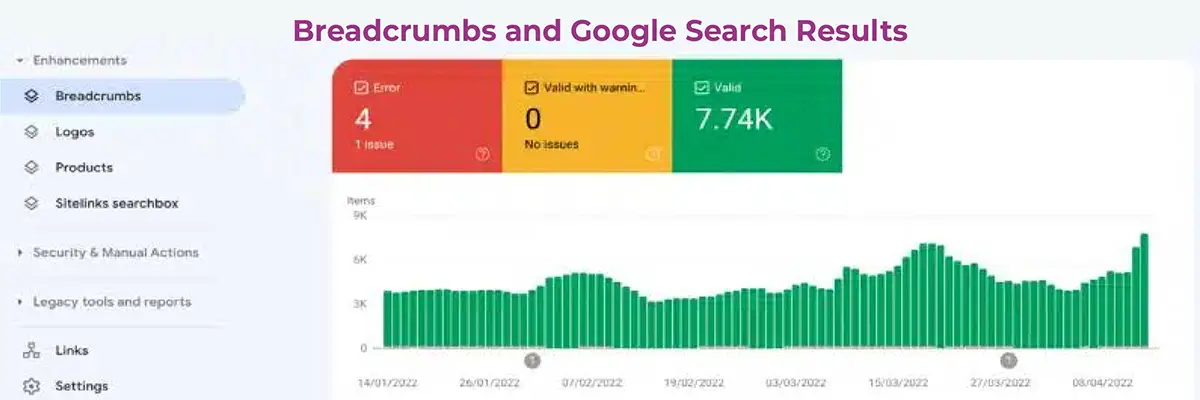
When a page has proper breadcrumb markup, Google can show that trail instead of the raw URL. A listing that reads example.com > Blog > Technical SEO > Breadcrumbs is easier to read than a long string of slashes. That clarity tends to lift click-through rate.
One thing changed in 2025. On 23 January, Google removed Google breadcrumbs from mobile search results. Mobile listings now show a simple site name and domain. The trail was not much use on small screens, where it often got cut off.
What the change left untouched:
- Breadcrumb trails still appear in desktop search results
- BreadcrumbList schema is still fully supported
- Google Search Console breadcrumbs reporting still works
- The Rich Results Test still validates breadcrumb markup
- Google told site owners no changes were needed
So if you added breadcrumbs just to improve a mobile snippet, that gain is gone. For site structure, internal linking, crawling, and navigation, nothing changed.
That markup is worth protecting. Search Engine Land documents a site that lost its breadcrumb schema during a template change. Click-through rate fell from 6.6% to 4.1%. It recovered to 7% three weeks after the markup went back.
Markup also states your hierarchy outright, instead of leaving Google to guess it from the URL. A page at example.com/services/local-seo can quietly show Home > SEO Services > Local SEO.
What Is Breadcrumb Schema Markup?
Visible breadcrumbs help visitors. Breadcrumb structured data tells search engines what the trail means. Breadcrumb schema uses the Schema.org type BreadcrumbList, written as JSON-LD. Each step carries a position, the name a visitor sees, and that level's full URL. The last step is the current page, so its URL is optional.
A few rules decide whether breadcrumb schema markup works:
- Use full URLs with https://.... Relative paths won't validate.
- Include at least two items. Homepages shouldn't carry breadcrumbs.
- Match the markup to what visitors can see.
- Show the typical user path, not your URL folder by folder. That is Google's guidance.
- Keep it on the page as served, not added by JavaScript.
The visible breadcrumbs HTML needs the same care as the rest of the page. Use a nav element with a breadcrumb aria-label. Add an ordered list of links. Keep the separator in your breadcrumbs CSS. Then check the markup with the Rich Results Test.
Types of Breadcrumbs
Hierarchy-Based Breadcrumbs
Hierarchy-based breadcrumbs are the most common type and the one worth building. They mirror your real category structure. The trail runs from the homepage down to the current page.
Home > Services > SEO > Technical SEO
The trail stays tied to your categories, so it looks the same for every visitor on that URL. That keeps the links stable and the schema simple. Ideal for blogs, service sites, and most online stores.
Attribute-Based Breadcrumbs
Attribute-based breadcrumbs are common on e-commerce sites with filters. They show the filters a shopper has applied.
Home > Shoes > Men > Running > Black
They help mid-purchase, but they need care. Filter combinations multiply fast and create near-duplicate trails. Every link must point at a clean canonical category page. Well suited to catalogs sorted by size, color, or brand.
History-Based Breadcrumbs
History-based breadcrumbs follow the pages a visitor clicked through, such as Home > Search Results > Product A > Related Product B.
That path changes every session, so you can't mark it up. The back button already does the job, and most sites should skip it. The same applies to checkout steps that are either noindexed or not, such as Cart > Shipping > Payment. Those are interface aids. Those pages aren't indexed, so they shouldn't carry schema.
Are Breadcrumbs Important for eCommerce SEO?
eCommerce breadcrumbs matter here more than anywhere. Catalog depth is the problem they solve. A shopper might sit five levels down:
Home > Furniture > Living Room Furniture > Sofas > Corner Sofas
The only way back is the menu or the back button. Neither creates an internal link. Breadcrumbs fix that. They link every product to the categories you want to rank. Three rules keep it clean:
- One primary category per product. The trail then never shifts.
- Never link to filtered URLs. They are noindexed or canonical elsewhere.
- Check mobile templates. Many themes hide breadcrumbs on small screens.
Shopify breadcrumbs and WooCommerce breadcrumbs ship with default themes. They just need switching on. On larger catalogs, plan for faceted navigation SEO.
Breadcrumbs for WordPress SEO
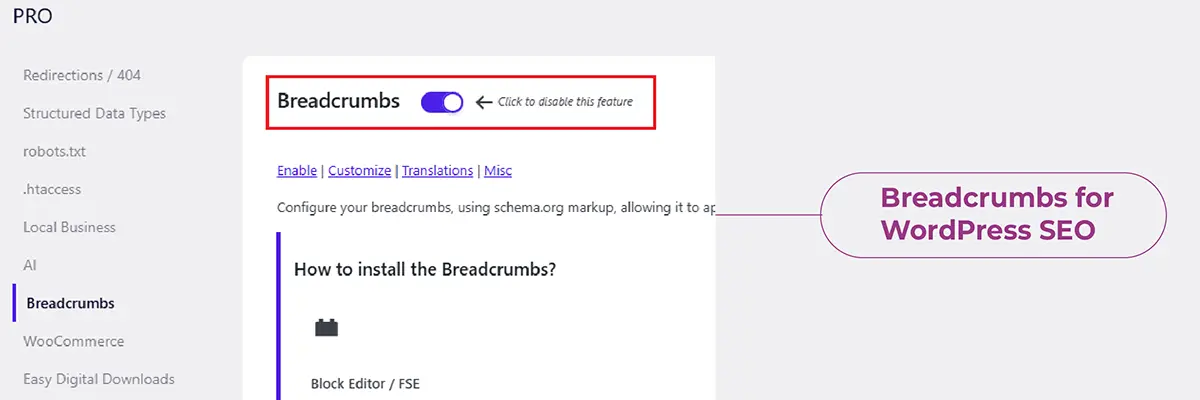
Most WordPress breadcrumbs are already on your site. They just need enabling, which makes the process an effortless win. Three options:
- Yoast breadcrumbs. They build the visible trail and the schema. Switch them on under Settings, Advanced, Breadcrumbs.
- Rank Math breadcrumbs. The same applies through General Settings, using a shortcode for templates.
- Breadcrumb NavXT. A dedicated plugin for finer control over each post type.
Check your theme first. Running two systems at once creates duplicate trails and clashing schema. It is easy to miss, because the page still looks fine. View the source and confirm only one breadcrumb block is there.
Then test. Run one page per template through the Rich Results Test. For site-wide issues, open the Breadcrumbs report in Search Console. Use a Screaming Frog structured data crawl to find what you missed.
Breadcrumb SEO Best Practices for 2026
- Keep the hierarchy logical. It should show the real link between pages, not one you wish you had.
- Start from the homepage, but skip it. A trail with one item shows nothing.
- Include the current page, but don't link it. It completes the trail. Linking a page to itself adds nothing.
- Keep parent levels clickable, and avoid extra depth. Three to five levels cover almost everything.
- Place them in the same spot on every template. Top of the content, below the menu, above the title.
- Make them mobile-friendly. Let a long trail scroll sideways or collapse in the middle. Don't hide it.
- Add Breadcrumb List schema that matches what users see. Visible breadcrumbs alone won't win the rich result.
- Re-check after every redesign or theme update. That is when breadcrumb markup tends to vanish unnoticed.
Common Breadcrumb SEO Mistakes
- A hierarchy that doesn't match your real website architecture. The most damaging one. It misleads visitors and crawlers at once.
- Breadcrumb links pointing at redirected or non-canonical URLs. Close behind. It wastes crawl budget and blurs your signals.
- Duplicate schema from a theme and an SEO plugin. The most common technical fault can be the quietest one.
- Leaving the current page out, or adding a breadcrumb to the homepage. Small errors that turn up constantly.
The rest are details. Breadcrumbs that vanish on mobile. Parent categories that aren't clickable. Long anchor text, broken links, relative URLs in the markup, and schema that only appears after JavaScript runs.
Breadcrumbs vs URL Structure: Are They the Same?
No. They overlap, which is why people confuse them. But they solve different problems.
Your URL is the page's address. A clean, SEO-friendly URL structure keeps it short and readable:
example.com/blog/breadcrumbs-seo
Your breadcrumb is on-page navigation. It can show more levels than the address does:
Home > SEO Blog > Technical SEO > Breadcrumbs
Notice the trail has four levels and the URL has two. That isn't a mistake. Google's own guidance says the breadcrumb should show the typical user path, not mirror the URL. The two are meant to differ.
The temptation is to force a match by pushing every category into the address. Don't. Deep URLs break as soon as you reorganize a category. A URL change costs far more than a tidy match is worth.
In practice: build the URL to be read, build the breadcrumb to be used, and let them differ.
Do Small Websites Need Breadcrumbs?
Not always. If your site is Home, About, Services, Blog, and Contact, a breadcrumb adds clutter and one spare link. The menu already shows everything.
The turning point is subcategories. Breadcrumbs start earning their space once you have service pages under service categories, posts under topics, or products under product types. For most sites, this means having around 30 to 50 pages with two levels of nesting.
Ask one question. Would a breadcrumb help someone landing on an inner page work out where they are? If yes, build it.
Are Breadcrumbs a Google Ranking Factor?
It is better not to treat them as a simple ranking factor. Their value comes from what they support. That means site architecture, internal links, clear navigation, and better links between pages.
You will also see breadcrumbs sold as an AI search tactic. Treat that with doubt. Google hasn't confirmed they affect AI Overviews or any generative feature. A clear hierarchy helps any system that sums up your content. But that argues for good structure in general, not for adding breadcrumbs to a five-page site.
Should You Use Breadcrumbs for SEO in 2026?
Yes, if your site is medium or large and has a clear hierarchy. They matter most when you have many categories, services, locations, or products.
Keep them accurate, visible, clickable, and consistent. Add valid structured data. Check the navigation on desktop and mobile. Google removing breadcrumbs from mobile snippets changed how a listing looks on one device. It didn't change why they were worth building.
Breadcrumbs are one of the rare SEO wins that cost almost nothing. They keep paying off quietly: easier navigation for visitors, a clearer map for crawlers, and a better line in desktop results.
FAQs About Breadcrumbs SEO
1. Do breadcrumbs improve SEO?
Not directly. They aren't a ranking factor on their own. But they support what search engines value: a clearer hierarchy, stronger internal linking, and easier navigation.
2. Does Google use breadcrumbs?
Yes. Google uses breadcrumb data to work out where a page sits in a site. It still shows those trails on the desktop.
3. What is breadcrumb schema in SEO?
It is BreadcrumbList structured data, usually a JSON-LD script. It lists each step with its position, name, and URL. Most SEO plugins build it for you.
4. Are breadcrumbs necessary for every website?
No. Small sites with a simple structure gain little. They grow more useful as a site gets deeper.
5. Should breadcrumbs contain SEO keywords?
Use plain words that name the category. Forcing exact-match keywords into the links feels odd and rarely helps.
6. Does Google still show breadcrumbs in mobile search results?
No. Google removed them from mobile snippets in January 2025. Mobile now shows a simple site name and domain. Desktop is unaffected.
7. Do breadcrumb schema links count as internal links?
They don't. John Mueller confirmed Google treats URLs in structured data differently. You still need real links on the page.
8. How do I add breadcrumbs in WordPress?
Turn them on in Yoast SEO or Rank Math, or install Breadcrumb NavXT. Check first that your theme doesn't already build a trail.